Posts

Showing posts with the label lnbmp

Swindle : Preview 5 out

 After a long time, Swindle preview 5 is out, small changelog - Updated to latest blackmagic engine - Preliminary support for RP2350 (host and target) - Support for voltage translators - RTT support (with auto setup) - Better cortex  register support (including trustzone ones) - Overall better stability, it should freeze much less often - and of course continued support for CH32V30x (host and target) 

Swindle : Voltage translator merged

Image
 The latest bunch of change was merged. The main change is the addition of a voltage translator to allow operation with a lower voltage chip. There is a jumper to select between native (3.3v) and translated (1.2,  1.5, ..) voltage Example with a RP2040 + Carrier board with voltage translators (They are a pain to solder btw, i put them too close to each others). Only CH32V3xx and RP2040 for now !

Setting up vscode+bmp/vscode to debug code in ram (RP2040)

 The main problem when debugging the code in ram is that the CPU will have started to execute whatever is in flash before you catch it, including potentially clearing the ram. As a result , the setup has to be done in 2 steps : - Have a "null" program in flash that does nothing -Tweak a little bit the vscode debug startup sequence Loop in flash The idea here is to modify the very first instruction and replace it with a endless loop. When you use lnArduino that means changing  mcus/arm_rp2040/sdk_copy/crt0.S and replacing the first instruction by       b _entry_point That way, after reset, it will harmelessly loop in the flash. Cortex-debug setup {   "version": "0.2.0", "configurations": [ { "name": "RAM- pico-load", "cwd": "${workspaceFolder}", "svdFile" : "${workspaceRoot}/.vscode/rp2040.svd", "executable": "build/st7789.elf", "gdbPath" : "${co...

lnBMP => Swindle

Image
In order to avoid confusion , i renamed lnBMP to  swindle   (swindle has SWD in it) It can run on :  GD32F303  CH32V303/5/7 (just need enough flash /ram)  RP2040 (normal or zero) and it can debug all the usual blackmagic targets + CH32V2XX/CH32V3XX. I dropped support for the bluepill / STM32F103 because it has not enough ram/flash and the CH32/GD32/RP are so cheap it is not even worth the time. The next item on my todo list is to update the blackmagic part and to use the PIO controller inside the RP2040 to do SWD / RVSW (Arm/CH32) Example: a itsy bitsy RP2040 zero debugging a CH32V30X based swindle board

rp2040 + BMP : Debugging code in RAM ?

  The RP2040 has a lot of RAM (264 kB) that is faster than the external flash and easier to use. It makes sense to put smallish code there to speed up the build/load/debug cycles until it works. Additionally, putting code in ram is a good way to speed up execution and/or deal with flash erase/writing. and.... it does not work well, the breakpoints are not triggering. How come ? The flash starts at address 0x1000 0000, the RAM starts at 0x2000 0000 BUT if you look at the cortex M0 breakpoint unit it can only put so called hw breakpoint between 0 and 0x1FFF FFFF, so it cannot put hw breakpoint in the RP2040 ram. As a result we need to use software breakpoint. It means replacing the opcode of the line you want to break on by a "brk #0" and putting back the old opcode when you stop.  Gdb does that through using Z0 for sw breakpoint and Z1 for hw breakpoint. Let's add that to swindle. There is a basic/naive implementation of ARM sw breakpoint on the dev branch of swindle, now ...

lnBMP : CH32V3xx support

Image
 It is painful, but it is beginning to work : On the picture a RP2040-pico zero running lnBMP and happily debugging a ch32v307 Riscv chip (of course it can still debug Arm chips) Perigoso did a lot of work there, only the communication protocol /implementation was missing. It is still a bit slow though :(

lnBMP : rp2040, Not forgotten

Image
  lnBMP : Lots of little issues tackled : - Preliminary FreeRTOS awareness through "mon fos M0|M3|M33' - Uart <->USB through DMA, that one was a pain - Configuration change to map the supported boards depending on the amount of RAM we have. But finally, here it is : lnBMP running on a RP2040 in a itsy bitsy case, and it works !

lnBMP + CH32V303!

Image
 Finally got the PCB (that was my first one) As expected a couple of mistakes (selected footprints too small etc..) but it works! Since the CH32V303 is running at 140 Mhz, it is faster than the bluepill based one. For reference, i did the same PCB for a GD32F303, and it was more complicated. The ch32v303 version is much simpler, no need for extra glue. The chip, a 8mhz crystal, couple of resistors and caps and that's it. I've also ran into a false problem. The normal BMP  just reboots when it asserts, so you dont see that happening. The lnBMP halts when it asserts, took me a bit of time to realize that was not due to a problem i introduced.

lnBMP+CH32V3 : Slowly getting there...

Image
 It is taking a bit of time, but getting there. What has changed since the last time : A tinyUSB based DFU bootloader  for the CH32V3x, a bit quirky but good enough for now and a small PCB (basically my first one) to host the CH32V303 and provides the pin out i usually use. Also, i fixed the hosted mode of lnBMP so it behaves like a genuine black magic, i.e. you can have the code running on your PC and use the BMP/lnBMP just as a hardware interface to your board.

lnBMP running on a CH32V303

Image
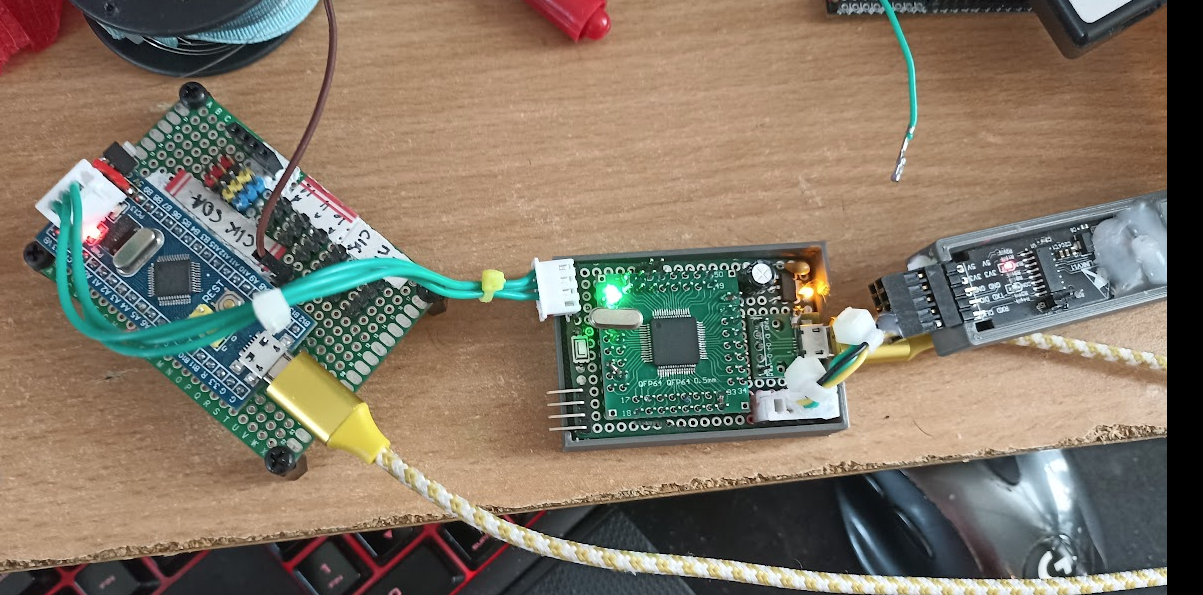
The lnBMP is a project using the blackmagic probe core + a gdb remote protocol parser written in rust, on top of the lnArduino framework. As it is running on lnArduino, i'm making sure it works also on the CH32v3x chips You can see from left to right  : 1- The bluepill board under debug 2-  lnBlackmagic running on a homeboard based on  CH32v303 3- The WCH debugger to debug the CH32V303 I ported a basic tinyusb driver for the ch32v3x so now it works to some extent! That WCH chip is pretty good, plenty of flash, plenty of ram, 144 Mhz, FPU, plenty of IO and compatible largely with the good ol' STM32F103.