Posts

DSO 150: Converting old analog board to new layout (part 1)
Image
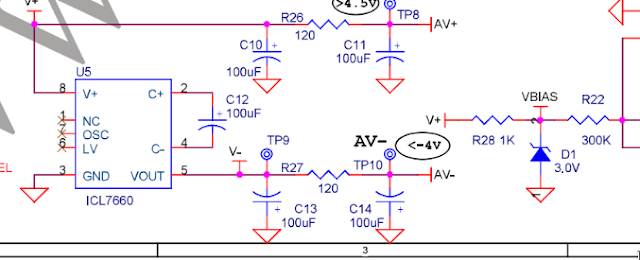
I have 2 DSO 150, one coming from the early models and one recent. The first models were sensitive to power supply voltage (calibration was changing depending on the power voltage) and to noise. This has been fixed on later revisions. The problems  come mostly  from the analog board power supply. There are some talks about it on the   Jyetech forum Let's see what we can do. The old power suppy looks like this : So the input is sent to ICL7660 inverter and the output is used 'as is", without much filtering except the 2x100uf caps. More annoying VBIAS which is used to shift the input to the middle of the ADC range is also derived from the unfiltered power supply (V+) through a 3v Zener. That raises 2 issues : Not very immune to mid/high frequency noise, i.e. if you use a DC/DC converter for example. Noise will go to the OpAMP power rails AND to VBIAS. VBIAS is not a very good ref voltage. It will change a bit if V+ changes and if temperature chan...
stm32duino : Debugging FreeRTOS threads

Debugging multi threaded program can be a real pain if you don't have thread support in the debugger. In my case, i'm debugging the STM32DUINO_DSO firmware which have ~ 4 threads running on top of FreeRTOS 10.2 I usually use my blackmagic, but it seems having it support FreeRTOS is not coming soon. So back to stlink v2 (cheap ebay clone) and openocd The openOcd version provided by ubuntu is recent enough, good. 1. openOcd configuration file Let's create a new profile for the bluepill, just activating FreeRTOS support.     cd /usr/share/openocd     cp  scripts/target/ stm32f1x.cfg   scripts/target/bluepill.cfg   sudo vi  scripts/target/bluepill.cfg There is only one line to change to activate freeRTOS support Look for $_TARGETNAME configure and add " -rtos FreeRTOS " just after configure i.e. line 47 becomes  $_TARGETNAME configure -rtos FreeRTOS -work-area-phys 0x20000000 -work-area-size $_WORKAREASIZE -work-area-bac...

stm32duino : Switching to a newer toolchain to reduce flash consumption

The default toolchain when using stm32duino / RogerClark is the SAM one available in the arduino repository. It is a bit old : gcc 4.8.3 2014 Let's build the DSO project with some toolchains, and see the effect on the flash size consumed. (/!\ The compiler options were not changed and could be sub optimal for some compilers, it is to get an idea of the gain without spending time on it) SAM / 4.8.3  : 114 kB Platform IO 7.2.1 : 118 kB stm32 8.2.1 / nano :  58 kB Damn !, the 8.2.1 is about half the size. It is pulled from  https://github.com/stm32duino/arm-none-eabi-gcc.git, and used in nano mode (--specs=nano.spec) A couple of gotcha though: The __always_inline_ macro is defined in a different way, which ends up with a "doubly define inline" error. The fix is easy  :  edit   ./arm-none-eabi/include/sys/cdefs.h,  go to line 380 and remove the __inline__ i.e. it should now be                 ...

Nice trick to debug STM32 (and most cortex M cores): improved assert

Something wrong with asserts is that you dont really know what to do with them. Print something, store stuff somewhere, put a breakpoint on it The problem with embedded debuggers is that the number of hardware breakpoints is small (~4 or so), so putting one there will consume one of those precious few. Or you could add  __asm__  ("bkpt 1"); To your assert function. That will stop the debugger without consuming a breakpoint.

Simplest diode tester

Image
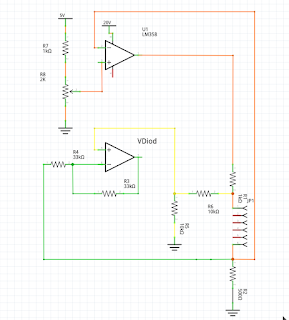
Diode mode on a voltmeter is great to test ...... diodes The main problem is that voltmeters don't get very high in terms of forward/reverse voltage. Some struggle with voltage higher than ~ 2.5 V, which is not enough for Zeners / Blue Led So i wanted a cheap, simple, usb powered diode tester. Let's see what was done The circuit is made of the following main parts : * 1/2 LM358 :A constant current circuit, the average value is 5 mA. It can be set using the pot. It means the LM358 is enough to deliver such current without a mosfet driver. * 1/2 LM358 : A differential amplifier to get the tension from the diode to test * A boost DC/DC converter, to raise the 5v input to 20 V * One ebay 1$ voltmeter And it works fine up to ~ 17v. The only issue is that the cheap voltmeter is not very accurate. I  have  tuned it to be accurate around 3v, the further away you get, the larger the error. But that's good enough for colored leds an low value zeners, which is 90% of my ...

DSO150 : Reverting to vanilla firmware

You can revert to Jyetech firmware easily, assuming you have a STLink v2 and soldered the SWD connector 1- Download the firmware from jyetech, unzip it 2- Power the board through the SWD connector and DONT SWITCH IT ON NEVER POWER BOTH VIA SWD AND VIA THE BOARD AT THE SAME TIME 3- st-flash --format ihex write 113-15001-064.hex since we dont touch at all the content of the eeprom chip, you shouldnt have issue with the serial number ( untested).

DSO 150 : (time) Trigger & stability

Image
First part of the trigger management is partially done (only in time mode). The trigger level is shown as an horizontal blue line on the screen. The capture  is centered around the trigger point automatically.  Since we capture only one sample at a time, dealing with trigger is easy. We can just check the current sample/previous sample against the trigger value, it is quick and can be done on the fly, within the interrupt loop. It is way more tricky with the hardware based capture (more on that later). It can be noted that the "triggered" version is stable, while the non triggered version is phase shifting slowly. That is  due to the fact that we automatically center the trigger point in trigger mode. No trigger Trigger